
Integration Testing with Data Warehouse
Author
Siddharth Mittal
April 27, 2026
Introduction
Organizations today rely heavily on data to drive decisions, improve customer experiences, and optimize operations. To manage large volumes of data coming from different systems, companies use a Data Warehouse. A data warehouse acts as a centralized repository where structured data from multiple sources is stored and prepared for analytics and reporting.
However, simply loading data into a warehouse is not enough. Businesses must ensure that the data flowing from various systems is accurate, complete, and correctly transformed. If incorrect data enters the warehouse, it can lead to wrong insights and poor business decisions. This is where Integration Testing becomes extremely important.
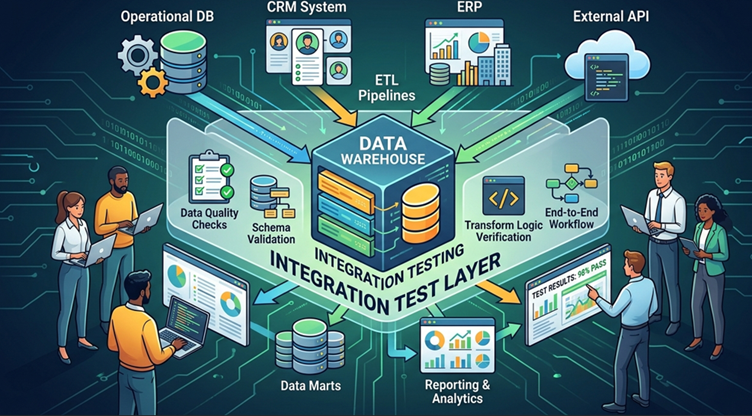
Integration testing in the context of a data warehouse focuses on validating the end-to-end flow of data between different systems. It ensures that data extracted from source systems passes through transformation processes correctly and finally reaches the warehouse without errors or inconsistencies.
Problem Statement
Modern organizations collect data from multiple systems and store it in a data warehouse for reporting and analytics. However, incorrect transformations, missing records, or duplicate data during ETL processes can lead to inaccurate insights. Therefore, integration testing is required to verify that data moves correctly from source systems to the data warehouse while maintaining accuracy, consistency, and completeness.
Understanding a Data Warehouse
A Data Warehouse is a system designed to store large amounts of structured data collected from multiple operational systems. Unlike transactional databases, which focus on real-time operations, data warehouses are optimized for analysis and reporting.
Typical data warehouse architecture contains the following components:
1. Source Systems
These are systems where the data originates. Examples include:
- Customer Relationship Management system i.e. Salesforce
- ERP systems
- Operational databases
- Web applications
- APIs
- Log systems
Each of these systems generates valuable business data.
2. ETL Processes
Data cannot be directly moved from source systems into the warehouse in most cases. Instead, the data goes through a pipeline called ETL (Extract, Transform, Load) .
The stages include:
Extract – Data is pulled from source systems.
Transform – Data is cleaned, formatted, and converted according to business rules.
Load – The transformed data is stored inside the warehouse.
3. Data Warehouse Storage
The warehouse stores structured datasets using tables such as:
- Fact tables
- Dimension tables
- Aggregated tables
These tables are designed for fast analytics.
4. Analytics Layer
Tools such as dashboards, business intelligence platforms, and reporting systems connect to the warehouse to generate insights.
Why Integration Testing is Important
Integration testing is critical because data warehouses support major business decisions. If incorrect data is stored, reports and dashboards will produce misleading results.
Below are some key reasons why integration testing is necessary.
Ensuring Data Accuracy
One of the main goals is to verify that the data stored in the warehouse matches the data in the source systems.
If a source table has 10,000 records but the warehouse only contains 9,900 records, there is clearly a problem.
Verifying Transformation Rules
ETL pipelines often apply business rules to the data.
Examples include:
- Converting currency values
- Aggregating sales totals
- Formatting dates
- Cleaning incorrect data
Integration testing verifies that these rules are applied correctly.
Preventing Data Loss
During data movement, some records may be skipped due to transformation errors, mapping mistakes, or pipeline failures.
Testing ensures that all valid records are successfully transferred.
Detecting Duplicate Records
Incorrect ETL logic can sometimes load the same data multiple times.
Integration testing identifies such duplication problems early.
Maintaining Data Consistency
When data is pulled from different systems, integration testing verifies that relationships between datasets remain consistent.
For example, if an order references a customer ID, that customer must exist in the customer table.
Steps in Data Warehouse Integration Testing
Integration testing usually follows a structured workflow. Testers validate data at different stages of the pipeline.
Step 1: Identify Source Data
Testers first select specific data from the source system.
| customer_id | name | country |
|---|---|---|
| 101 | Rahul | India |
| 102 | John | USA |
These records will be used to track how the data moves through the pipeline.
Step 2: Run the ETL Pipeline
The ETL job is executed to move data from the source system to the warehouse.
During this process, data transformations may occur.
Examples of transformations include:
- Standardizing country names
- Removing invalid records
- Converting data formats
Step 3: Validate Data Transformation
After the ETL process runs, testers verify whether the transformation rules were correctly applied.
For example, a transformation rule may convert country names to uppercase.
| customer_id | name | country |
|---|---|---|
| 101 | Rahul | INDIA |
| 102 | John | USA |
Step 4: Validate Target Data
Next, testers check the data stored in the warehouse tables.
They ensure that:
- All records were loaded
- No fields are missing
- Data values are correct
Step 5: Compare Source and Target Data
Finally, the tester compares the source and warehouse data.
Key validations include:
- Row counts
- Data accuracy
- Null values
- Duplicate records
Simple SQL Query for Testing
SQL queries are widely used to validate data in warehouses. One of the simplest checks is comparing record counts between the source and target tables.
Example query to count records in the source system:
SELECT COUNT(*) FROM customers_source;
Then check the warehouse table:
SELECT COUNT(*) FROM customers_dw;
If both queries return the same number of records, it indicates that all records were successfully loaded.
Although this check is simple, it is one of the most common validations in integration testing.
Example Testing Scenario
Let us consider a simple example involving order data.
Source Table
Table name: orders_source
| order_id | customer_id | amount |
|---|---|---|
| 1 | 101 | 500 |
| 2 | 102 | 300 |
Transformation Rule
During ETL processing:
- Amount values must be positive
- Null records must be removed
Data Warehouse Table
Table name: orders_dw
| order_id | customer_id | amount |
|---|---|---|
| 1 | 101 | 500 |
| 2 | 102 | 300 |
Validation Process
The tester performs several checks:
- Verify the number of records.
- Confirm that all columns are populated.
- Ensure transformation rules were correctly applied.
If all checks pass, the integration test is considered successful.
Common Integration Testing Techniques
Record Count Validation
The tester compares the number of rows between source and warehouse tables.
If counts match, the data transfer likely succeeded.
Data Sampling
Instead of validating the entire dataset, testers randomly check selected records.
This technique helps identify transformation issues.
Aggregate Validation
Testers compare summary metrics such as totals and averages.
For example:
Total sales from source system should match total sales in the warehouse.
Duplicate Detection
Duplicate records can cause incorrect reporting.
Testers use queries to detect duplicates.
Example query:
SELECT customer_id, COUNT(*)
FROM customers_dw
GROUP BY customer_id
HAVING COUNT(*) > 1;
This query helps identify duplicate customer records.
Challenges in Data Warehouse Integration Testing
Although integration testing is essential, it comes with several challenges.
Large Data Volumes
Data warehouses often contain millions or billions of records. Testing such large datasets requires efficient strategies.
Complex Business Rules
Some transformations involve complicated calculations, joins, and aggregations.
Testing these rules requires deep understanding of business logic.
Multiple Data Sources
Data may originate from different systems with different formats and structures.
This increases testing complexity.
Data Dependency Issues
Data relationships between tables must remain intact during transformation.
For example, order records must reference valid customer records.
Best Practices for Integration Testing
To ensure reliable testing, teams follow several best practices.
Use Controlled Test Data
Testing with small and controlled datasets makes it easier to identify issues.
Automate SQL Validations
Automation scripts can run validation queries automatically after each ETL execution.
Monitor ETL Logs
ETL tools usually generate logs that provide details about failures and data issues.
These logs help testers diagnose problems efficiently.
Test Incrementally
Instead of testing the entire pipeline at once, validate each stage separately.
This helps isolate failures quickly.
Day 0,
Day 1
Day 2
This will give you an real flow
Conclusion
Integration testing is a critical activity in any data warehouse project. It ensures that data moving from multiple source systems is correctly extracted, transformed, and loaded into the warehouse. Without proper testing, organizations risk relying on inaccurate data for decision-making.
By validating record counts, checking transformation rules, and using SQL queries for verification, testers can ensure that the data pipeline works correctly. Even simple validation techniques can detect major issues before the data reaches reporting systems.
As businesses continue to depend on analytics and data-driven insights, maintaining high data quality becomes essential. Integration testing plays a key role in achieving that goal by ensuring that the data warehouse remains a reliable and trustworthy source of information.
Looking to streamline your Salesforce integrations and eliminate data silos
Connect with Mirketa Inc your trusted experts in building seamless, scalable, and high-performance Salesforce integrations.
- Connect Salesforce with your Data Warehouse, APIs, and third-party systems
- Ensure real-time data sync and accuracy
- Boost efficiency with automation-driven workflows
- Get end-to-end support from certified Salesforce professionals
Recent Posts
-
 Why Finding Bugs Is Not the Main Job of a QA Engineer31 Jul 2026 Blog
 -
 How AI Is Transforming Salesforce Testing31 Jul 2026 Blog
 -
 Salesforce Performance Testing: Enterprise Best Practices30 Jul 2026 Blog
 -
 What Is MCP and Why It Matters for Salesforce/ERP Integrations28 Jul 2026 Blog
 -
 The Hybrid Advantage in Salesforce QA20 May 2026 Blog
 -
 CI/CD in Salesforce: Role of QA in DevOps Pipeline19 May 2026 Blog
 -
 Reasons Why Addiction Treatment Centers should consider leveraging Salesforce as a CRM18 May 2026 Blog
 -
 Insights on employee engagement15 May 2026 Blog
Deliver fast but never at the cost of quality.