






What is Salesforce Experience Cloud? Your Gateway to Branded Digital Experiences (A Developer's Guide)

Author

Quick Hook: Ever wondered how global brands create sleek, custom-branded portals for their customers, partners, or even employees, all powered by Salesforce data without the headache of backend integrations? That “magic” is often Salesforce Experience CloudIt’s where your Salesforce data transforms into dynamic, engaging digital front doors. 
salesforce-data

Introduction

As a Salesforce developer with 3 years immersed in the Experience Cloud ecosystem, I’ve seen firsthand how this platform bridges the gap between powerful CRM data and elegant, external-facing digital experiences. Forget the days of clunky integrations or siloed information; Experience Cloud is your accelerator for building rich, secure, and highly customized portals, help centers, partner hubs, and microsites. 

This guide isn’t just a definition; it’s your developer-centric introduction to understanding its power, navigating its architecture, and leveraging its capabilities to build solutions that truly stand out. 
salesforce-data

TLDR: Experience Cloud in a Nutshell

Salesforce Experience Cloud is Salesforce’s robust platform for crafting secure, brandable, and extensible digital experiences that read and act on Salesforce data. Think of it as the evolution of the much-loved (and now rebranded) Community Cloud, supercharged for the modern digital landscape. It’s your go-to for customer-facing and partner-facing sites that feel native, responsive, and deeply integrated. 

Why Should You Care? (Beyond the Buzzwords)

For the Business Visionary: Experience Cloud isn’t just a development tool it’s a strategic asset. You can rapidly deploy: 

  • Vibrant Communities: Foster engagement, support, and collaboration among customers. 
  • Efficient Support Portals: Empower customers with self-service knowledge bases and case submission. 
  • Dynamic Partner Deal Rooms: Streamline lead sharing, deal registration, and collaborative selling. 
  • Targeted Microsites: Launch product catalogs, contract hubs, or localized storefronts that directly tap into Salesforce opportunities, cases, assets, and custom objects.
     

This means faster time-to-market, reduced integration complexities, and a unified data experience that delights external users and internal teams alike. 

For the Salesforce Developer (That’s You!): This is where the rubber meets the road. Experience Cloud offers a rich developer surface: 

  • Lightning Components (Aura & LWC): Full flexibility to build custom UI elements and complex workflows. 
  • Powerful CMS: Centralize content management and delivery across multiple channels. 
  • Extensive APIs: Seamlessly integrate with external systems and extend functionality. 
  • Flexible Page Templates: Get a head start with pre-built layouts or craft your own from scratch. 
  • Robust Security Model: Fine-tune data visibility and access for external users with profiles, permission sets, and sharing rules.
     

You’re equipped to deliver sophisticated solutions while keeping UI customization and maintainability firmly in check.  

Core Capabilities: The Toolkit You'll Love

At its heart, Experience Cloud provides a suite of powerful tools: 

  • Experience Builder & Templates: Your visual playground. A drag-and-drop interface complemented by intelligent starter templates for everything from partner portals to customer help centers. Get up and running fast, then customize to your heart’s content. 
  • CMS + Content Delivery: Centralize your rich content (images, documents, articles) and publish it effortlessly across your Experience Cloud sites, mobile apps, or other digital channels. Consistent branding, everywhere. 
  • Authentication & Sharing: Designed for the external user. Leverage flexible login options, Single Sign-On (SSO), and a granular security model with profile/role-based sharing and permission sets specifically tailored for external users. 
  • Lightning Components (Aura & LWC): The developer’s superpower. Embed custom components, call Apex methods directly, or integrate third-party widgets to extend functionality far beyond out-of-the-box. 
  • SEO & Guest Access Tools: Make your public content discoverable. Tools to make pages indexable, control sitemaps/URLs, and configure guest user behavior for search engine crawlers – a critical feature often overlooked! 

Real-World Use Cases: Where Experience Cloud Shines

Let’s look at some common scenarios where Experience Cloud transforms operations: 

  • Customer Support Portal: Imagine customers resolving issues faster. Publish comprehensive knowledge bases, facilitate peer-to-peer support with community Q&A, and provide intuitive case submission flows that directly create Salesforce Cases. Reduced call volume, happier customers. 
  • Partner / Dealer Portal: Empower your extended sales force. Share qualified leads, simplify deal registration, provide up-to-date pricing, and deliver performance dashboards directly to external partners. Foster collaboration and accelerate sales cycles. 
  • B2B Microsites: Create highly specific, branded digital experiences. Whether it’s product catalogs, secure contract download hubs, or localized microsites, seamlessly integrate with your existing Salesforce objects to deliver personalized content. 

These aren’t just websites; they’re intelligent, data-driven digital hubs.  

Architecture Snapshot: A Developer's View

Understanding the layers is key to building robust solutions: 
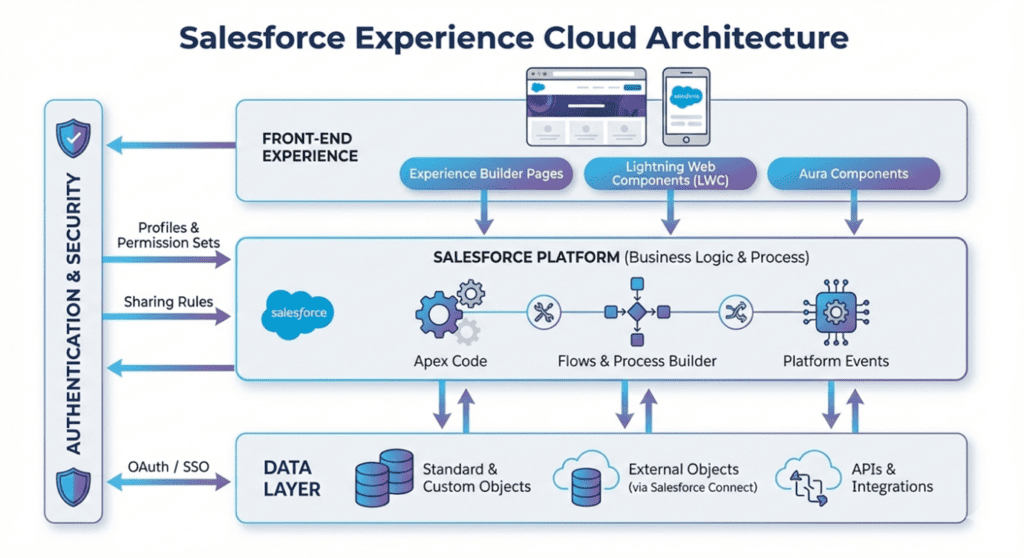
  • Front-end: This is where Experience Builder pages come to life, primarily utilizing Aura or Lightning Web Components (LWCs). This layer is all about user interaction and visual presentation. 
  • Salesforce Platform: The brain of your operation. Apex, Flows, and Platform Events handle your business logic, data manipulation, and complex automations that drive your experience. 
  • Data Layer: Your information hub. This includes native Salesforce objects, external data exposed via External Objects, direct APIs, or integrated through Salesforce Connect. 
  • Authentication & Security Layer: The gatekeepers. Profiles, permission sets, sharing rules, and OAuth/SSO mechanisms govern who can access what, ensuring your external users operate within defined boundaries. 
salesforce-data

SEO + Content Tips: Don't Just Build It, Get It Found!

Experience Cloud sites can rank high on search engines, but it requires deliberate effort. Don’t fall into the trap of neglecting SEO for external-facing sites. 

Quick Checklist for SEO Success: 

  • Public Pages at Root Level: For content you want indexed, ensure it’s accessible without requiring a login and ideally at the root level of your site structure. 
  • Clear Page Titles and H1s: Every knowledge article, product page, or community discussion needs descriptive titles and well-structured headings for search engines and users alike. 
  • Generate and Submit Sitemaps: Help search engines discover all your valuable content. 
  • Avoid Duplicate Content: Be mindful of how multiple site templates or dynamic content might create duplicate URLs; use canonical tags where appropriate. 
  • Optimize for Guest Users: Ensure public content loads efficiently for unauthenticated users, as search engine crawlers behave like guest users. 
  • Leverage Experience Builder’s SEO Settings: Don’t forget to configure meta descriptions, keywords, and other SEO attributes directly within the builder. 

A Developer’s Mini-Playbook: My Go-To Steps

Having navigated various Experience Cloud projects, here’s my distilled playbook: 

  1. Deep Discovery: Don’t skip this! Define your target personas (guest, customer, partner, employee). Map out their journeys and precisely identify which Salesforce objects and processes they’ll interact with. This is where 90% of future headaches are avoided. 
  2. License & Domain Setup: Confirm you have the correct Experience Cloud licenses. Reserve your domain (e.g., partners.yourcompany.com) and ensure HTTPS is configured from day one. 
  3. Prototype UI & User Experience: Start with a skinny Experience Builder site using a relevant template. Use mock LWC components or placeholders to visualize the user flow before deep-diving into Apex. Prioritize user experience above all else. 
  4. Data & Security Modeling (CRITICAL): This is the make-or-break phase. Model your sharing rules, guest user profiles, permission sets, and site access. NEVER accidentally expose sensitive objects. Always test as every persona, especially the guest user. 
  5. Automation & Business Logic: Wire up your Flows and Apex for forms, approvals, record creation, and any complex business logic. Keep it modular and well-documented. 
  6. SEO & Performance Optimization: Enable Content Delivery Networks (CDNs), optimize images, set appropriate cache headers, and rigorously configure your SEO rules. A fast, findable site is a good site. 

Pitfalls I’ve Hit (So You Don’t Have To) 
My 3 years haven’t been without their bumps. Learn from my missteps: 

  • Guest-User Leaks: This is the most dangerous. Misconfigured sharing settings, or Apex that runs in without sharing context without proper checks, can inadvertently expose sensitive data to unauthenticated users. Always, always, always test as a guest user meticulously. 
  • Over-Customization Syndrome: It’s tempting to replace entire templates with heavy custom code. While LWCs are fantastic for discrete components, avoid full page rewrites if an out-of-the-box solution or minimal customization suffices. It leads to maintenance nightmares and upgrade challenges. 
  • SEO Surprises with Dynamic Content: JavaScript-rendered dynamic content, while visually appealing, may not always be crawl-friendly for search engines. For content where SEO is paramount (like knowledge articles), prefer server-renderable content or ensure proper pre-rendering strategies are in place. 

Wrapping It Up: Your Next Steps

Salesforce Experience Cloud is more than just a product it’s a paradigm shift in how businesses interact with their external stakeholders. As a developer, embracing Experience Cloud means expanding your skillset to build not just functional, but truly experiential digital platforms. 

Dive in, experiment with the Experience Builder, get comfortable with the security model, and start envisioning how you can transform your organization’s external engagements. The future of digital experiences, powered by Salesforce, is here – and you’re at the forefront. 

Have you tackled an Experience Cloud project? Share your insights and challenges in the comments below! 

Talk to a Salesforce Testing Expert and explore how we can help you build a connected and efficient digital ecosystem.