







Skip to content

What Is MCP and Why It Matters for Salesforce/ERP Integrations

Author

Introduction

Every enterprise that runs on Salesforce, an ERP system, or both, eventually hits the same wall: the systems hold enormous amounts of business data and logic, but connecting AI tools to that data in a safe, scalable way is hard. Each new AI assistant needs its own integration, its own authentication flow, and its own custom code to talk to Salesforce objects, ERP modules, and everything in between. As organizations add more AI agents to their workflows, this one-off integration approach quickly becomes unmanageable. 

This is the exact problem the Model Context Protocol (MCP) was created to solve. In this post, we will break down what MCP actually is, how it works under the hood, and  more importantly — why it is becoming a critical piece of infrastructure for teams running Salesforce and ERP integrations. 

The Integration Problem Before MCP

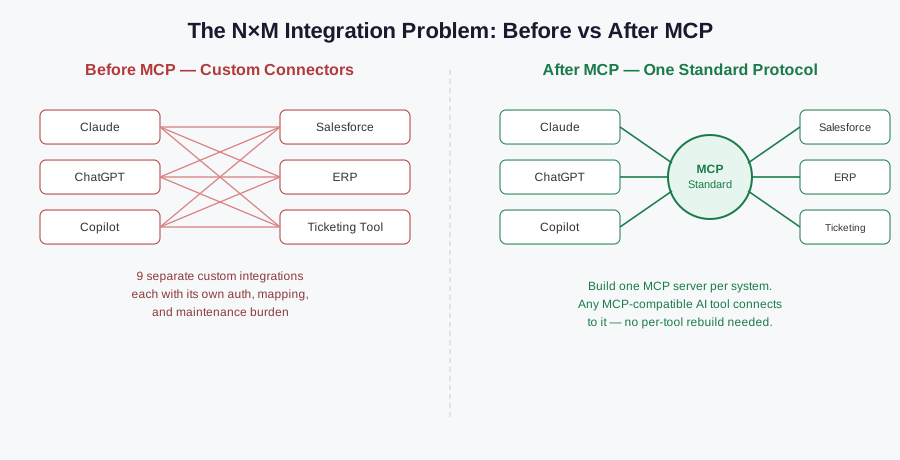
Before MCP existed, connecting an AI model to an external system like Salesforce, SAP, or Oracle NetSuite meant writing a dedicated integration for every single combination of AI tool and business system. If your company used three different AI assistants and needed each of them to talk to Salesforce, your ERP, and a support ticketing tool, you were looking at potentially nine separate point-to-point integrations  each with its own authentication logic, data mapping, error handling, and long-term maintenance burden. 

This is sometimes called the “N×M integration problem.” As the number of AI tools (N) and the number of business systems (M) grow, the number of custom connectors required grows just as fast, and every one of them has to be maintained, secured, and updated independently. For Salesforce developers and architects, this usually meant building and babysitting a tangle of REST callouts, middleware layers, and custom Apex classes just to give an AI assistant limited, brittle access to CRM data. 

What Is MCP, Exactly?

The Model Context Protocol is an open standard that defines a common, structured way for AI models and AI agents to discover, request, and use external tools, data sources, and functions. Instead of a developer writing a unique connector every time a new AI assistant needs to talk to Salesforce, they build a single MCP server for Salesforce once — and any AI application that understands MCP can plug into it immediately, without additional custom development. 

A simple way to think about MCP is as a universal connector, similar in spirit to how USB-C standardized device charging and data transfer across manufacturers. Before USB-C, every device had its own proprietary cable and port. MCP aims to do the same thing for AI-to-system communication: one protocol, many compatible tools on either side. 

MCP was originally introduced by Anthropic as an open standard, and it has since been adopted well beyond Anthropic’s own ecosystem — major platforms including OpenAI, Microsoft Copilot, and Salesforce itself have all added support for it. This broad adoption is precisely what gives MCP its value: it is not tied to one vendor, so a Salesforce MCP server you build today can serve Claude, ChatGPT, Copilot, or an internally built agent tomorrow, all through the same interface. 

How MCP Works: The Building Blocks

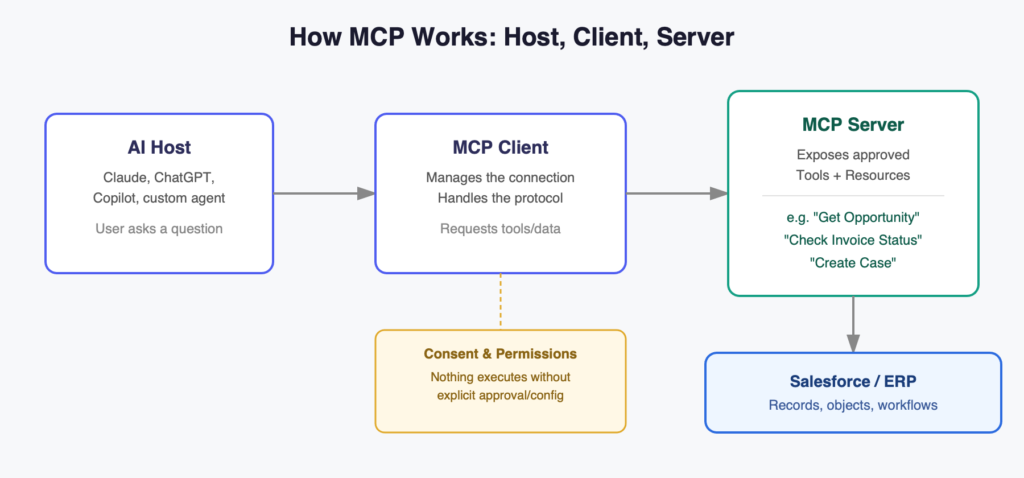
To understand why MCP matters for Salesforce and ERP work specifically, it helps to understand its basic architecture. MCP is generally described in terms of three roles: 

  1. The Host— this is the AI application itself, such as an AI assistant, an IDE-based coding agent, or a custom enterprise chatbot. The host is what the end useractually interacts with. 
  2. The Client— a lightweightcomponent inside the host that manages the connection to one or more MCP servers, handling the technical back-and-forth of the protocol. 
  3. The Server— this is where thereal business logic and data access live. An MCP server exposes a defined set of capabilities: “tools” (functions the AI can call, like “create a case” or “fetch invoice status”), “resources” (data the AI can read, like account records or product catalogs), and sometimes prompt templates. 

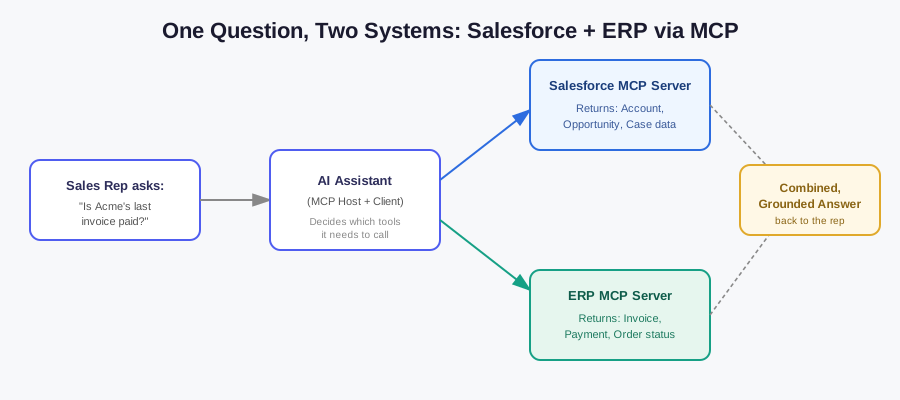
When a user asks an AI assistant something like “summarize open opportunities for this account and check if the last invoice was paid,” the AI host doesn’t need to know Salesforce’s internal API structure or the ERP’s data schema by heart. Instead, it asks the connected MCP servers what tools and data are available, requests only what it needs, and the servers handle the actual work of talking to Salesforce or the ERP system behind the scenes. The AI model reasons about what to ask for; the MCP server handles how to get it. 

Crucially, MCP is built with permissions and governance in mind. Access to a tool or a piece of data isn’t automatic  it typically requires explicit configuration and, in many implementations, user or admin consent before a model is allowed to read or write anything. This matters enormously in an enterprise context, where you cannot afford an AI agent making unauthorized changes to a customer record or a financial ledger.

Why This Matters Specifically for Salesforce Integrations

Salesforce has moved quickly to support MCP as part of its broader Agentforce strategy, and this has practical implications for anyone doing Salesforce development or administration today. 

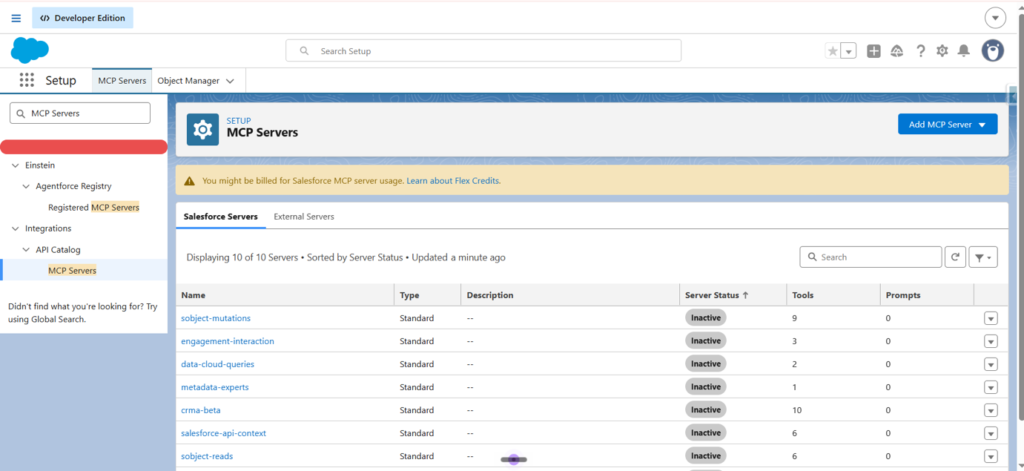
Hosted MCP servers: Salesforce now offers the ability to configure MCP servers directly within an org, giving external AI clients — Claude, ChatGPT, Cursor, or a custom-built agent — a secure, OAuth-authenticated way to interact with Salesforce data and automation. Instead of building a REST integration from scratch every time a new AI tool needs Salesforce access, an admin or developer configures the server once, and any MCP-compatible client can connect to it going forward. 

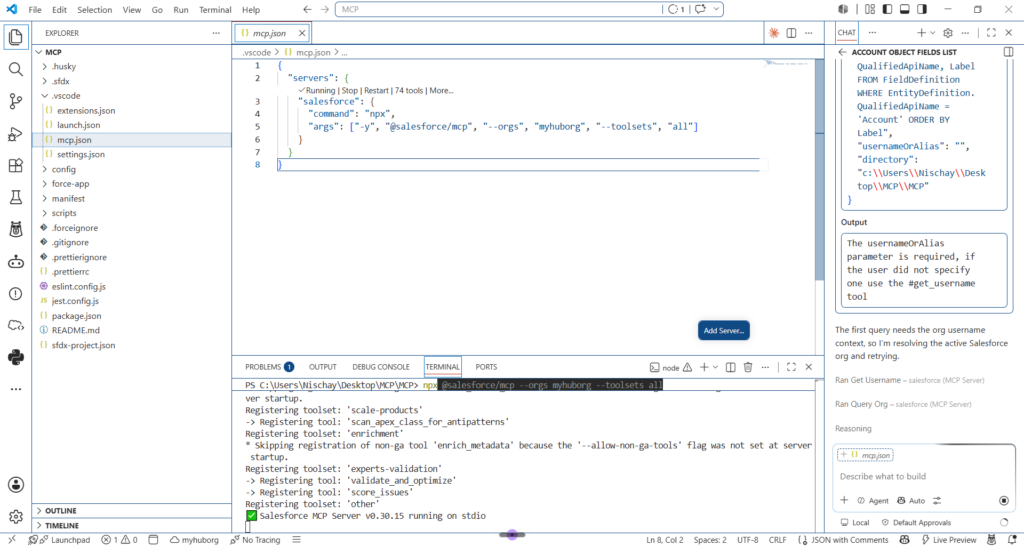
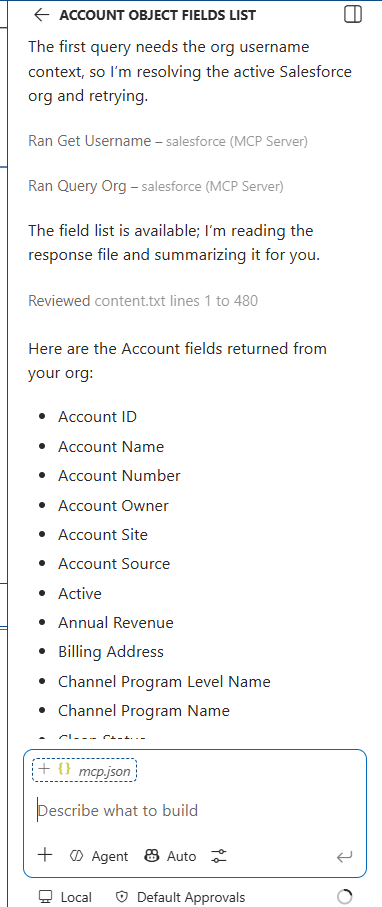
The Salesforce DX MCP Server: For developers specifically, Salesforce has introduced an MCP server that plugs into coding-focused AI assistants, allowing them to interact with development workflows, metadata, and org information more naturally, without needing hardcoded knowledge of every Salesforce CLI command or API endpoint. 

AgentExchange and pre-built connectors: Rather than every company building its own MCP server for every third-party tool, Salesforce is curating a marketplace-style catalog (AgentExchange) of vetted MCP servers that can be deployed into Agentforce with minimal setup, reducing the integration overhead even further.

Governance through Agentforce: Since AI agents acting on business-critical data is a real risk, Salesforce has paired its MCP support with governance tooling — control over what an agent can see, what actions it can take, and audit visibility into what it actually did. For a Salesforce developer, this means MCP isn’t just “another integration pattern” — it’s becoming the standardized, sanctioned way Salesforce expects AI agents to interact with org data going forward. 

For teams like ours working on complex, data-heavy Salesforce implementations — CMS billing logic, EDI file generation, vendor rate calculations, care coordination workflows, and so on — this shift is significant. A well-configured MCP layer means an AI assistant could, in principle, be given controlled access to specific objects, flows, or Apex actions relevant to a task, without a developer needing to hand-build a bespoke integration every time a new AI use case comes up. 

Why This Matters for ERP Integrations Too

The same logic applies just as strongly to ERP systems like SAP, Oracle, Microsoft Dynamics, or NetSuite. ERPs typically hold financial, inventory, procurement, and operational data that is deeply structured and tightly access-controlled — exactly the kind of environment where uncontrolled AI access would be dangerous, but controlled, well-governed AI access could be extremely valuable. 

With MCP, an ERP vendor or an internal development team can expose a defined, permissioned set of capabilities — “check invoice status,” “retrieve purchase order details,” “get inventory levels for SKU X” — as MCP tools. Any MCP-compatible AI agent can then use those tools without the ERP team needing to build a separate integration for every AI platform that wants access. 

This becomes especially powerful in scenarios where Salesforce and an ERP need to work together through an AI layer. Consider a support or sales agent asking an AI assistant, “Has this customer’s latest order shipped, and is their account current on payments?” Answering that question well requires pulling CRM data from Salesforce and financial/operational data from the ERP simultaneously. Historically, this required a custom middleware integration connecting the two systems and then a separate integration connecting that middleware to whichever AI tool needed it. With MCP, both Salesforce and the ERP can expose their own MCP servers, and a single AI host can query both directly, using a consistent protocol on both ends. 

It’s worth being clear about where MCP fits best, though. It is not meant to replace deterministic, high-reliability integration patterns for things like nightly ERP-to-CRM syncs, payment processing, or regulatory data exports — those still call for dedicated integration pipelines with proper retries, idempotency, and monitoring. MCP shines in user-driven, on-demand scenarios, where an AI agent needs to dynamically choose from a set of approved tools based on what a person is asking for in the moment, rather than running a fixed, scheduled process. 

Key Benefits of Adopting MCP

Reduced development effort. Once an MCP server exists for a system like Salesforce or an ERP, it can serve many different AI clients without additional custom-integration work for each new one. This directly cuts down on repetitive, redundant integration code. 

Consistency across AI tools. Whether your organization standardizes on one AI assistant today or supports several different ones tomorrow, MCP means the underlying connection to Salesforce or the ERP doesn’t need to be rebuilt for each one. 

Stronger security posture. Because MCP is designed around explicit permissions and consent, it naturally encourages a more disciplined approach to what data and actions an AI agent can touch, compared to ad hoc integrations that might be built quickly and reviewed less carefully. 

Faster time-to-value for new AI use cases. Business teams asking “can our AI assistant check X in Salesforce” or “can our agent pull Y from the ERP” can often be answered much faster once the relevant MCP tools already exist, rather than starting a new integration project from zero. 

Vendor flexibility. Because MCP is an open standard rather than a proprietary one, organizations aren’t locked into a single AI vendor’s ecosystem just because that’s the one their Salesforce or ERP integration was originally built for.

Practical Considerations and Risks

MCP is powerful, but it isn’t a free pass to expose everything to every AI agent. A few things are worth keeping in mind as adoption grows: 

  • Scope tool access tightly. An MCP server should expose a small, well-defined set of approved tools and data — not blanket access to every object, record, and automation in an org. 
  • Treat high-risk write actions carefully. Actions that create financial transactions, modify sensitive records, or trigger downstream automations deserve extra scrutiny and, in many cases, human approval steps before an AI agent is allowed to execute them autonomously. 
  • Document what each tool actually does. If an MCP tool calls an Apex action or a Flow, that logic — including its fault paths and edge cases — should be clearly documented so the behavior an AI agent triggers is predictable and auditable. 
  • Plan for governance, not just connectivity. Getting an MCP server running is the easy part; deciding who can configure it, what it’s allowed to touch, and how its usage is logged and reviewed is the part that actually determines whether it’s safe for production use. 

Real-World Use Cases Worth Knowing

To make this less abstract, here are a few concrete scenarios where an MCP-connected setup changes what’s possible for Salesforce and ERP-driven businesses: 

Sales and account teams getting instant, cross-system answers. A sales rep asks an AI assistant, “What’s the payment status and shipment status for Acme Corp’s last three orders?” Instead of the rep manually switching between Salesforce and the ERP screen, an MCP-enabled agent pulls opportunity and account data from Salesforce and order/payment data from the ERP in a single conversational response. 

Support agents resolving tickets faster. A support engineer working a case in Salesforce Service Cloud can ask an AI assistant to check inventory availability or warranty status directly from the ERP, without leaving their workflow or waiting on a separate system lookup. 

Developers working faster inside their IDE. With the Salesforce DX MCP Server, a developer’s AI coding assistant can pull real information about org metadata, Apex classes, or deployment status directly, rather than the developer having to manually copy-paste details back and forth between the org and their editor. 

Finance and operations teams doing reconciliation. An AI agent connected to both a Salesforce billing object and an ERP’s accounts-receivable module can be asked to flag mismatches between what Salesforce shows as invoiced and what the ERP shows as paid — surfacing discrepancies that would otherwise require a manual cross-system audit. 

Admins configuring AI access without custom code. Instead of an admin asking a developer to build a bespoke API integration every time a new AI tool needs Salesforce access, they can configure a hosted MCP server, define which objects and actions are exposed, and let approved AI clients connect through standard OAuth — no Apex callout required for the connection itself. 

These examples share a common thread: they all replace what used to be either manual, multi-system work, or a custom-built one-off integration, with a standardized connection that any approved AI tool can reuse. 

The Road Ahead

MCP is still a young standard, but its trajectory is clear. Major CRM and ERP-adjacent platforms are moving quickly to support it, AI vendors across the industry are converging on it rather than pushing competing proprietary protocols, and enterprise tooling around governance and marketplaces (like AgentExchange) is maturing fast. For Salesforce and ERP professionals, this means MCP isn’t a passing trend — it is quickly becoming the default expectation for how AI agents are meant to connect to enterprise systems. 

For development teams, the practical takeaway is this: instead of treating every new AI integration request as a one-off project, it’s worth investing in a well-designed MCP layer over your Salesforce org and ERP systems now. That investment pays off every time a new AI use case comes along, because the hard work of secure, governed connectivity is already done — the only thing left to do is decide which tools to expose to which agents. 

Conclusion

MCP solves a problem that has been quietly slowing down enterprise AI adoption for years: the sheer cost and fragility of building custom integrations between every AI tool and every business system. By standardizing how AI agents discover and use tools and data, MCP turns Salesforce and ERP connectivity into something you build once and reuse across many AI clients, rather than something you rebuild every time a new assistant enters the picture. As Salesforce, ERP vendors, and AI platforms continue to align around this standard, understanding MCP isn’t just useful for staying current — it’s becoming essential for anyone designing the next generation of intelligent, connected business systems. 

Author

FAQ

FAQs

introduced by Anthropic, but it is an open standard. It has since been adopted by other major AI platforms, including OpenAI and Microsoft Copilot, and by enterprise platforms like Salesforce and HubSpot. Any AI client built to understand MCP can, in principle, connect to any MCP server.

No. MCP servers are typically built on top of existing APIs — they don’t replace REST APIs, Apex, or ERP web services; they standardize how AI agents discover and call them, so the underlying integration logic doesn’t need to be reinvented for every new AI tool.

MCP’s design includes permissioning and consent mechanisms, and Salesforce has paired its MCP support with Agentforce’s governance and trust layer. That said, security in practice depends heavily on how narrowly an organization scopes what each MCP server exposes — a well-designed MCP server limits access to specific, approved tools and data rather than granting broad access by default.

Not necessarily. Existing integrations can often continue running as-is for scheduled, deterministic processes. MCP is most useful for new, AI-driven, user-initiated use cases — you can adopt it incrementally rather than replacing everything at once.


You Have Questions,
We Have Answers

Talk to our experts today and explore how we can help you build a connected and efficient digital ecosystem.